Back Up to S3: 6 Prerequisites and Recipes for IT Teams
Back Up to S3: 6 Prerequisites and Recipes for IT Teams

The right way to back up to S3 depends on what you’re protecting. Use AWS Backup for S3-native buckets and centralized policy across accounts. Use client-side tools like restic, rclone, or aws s3 sync for servers, database dumps, and workloads that need deduplication. A managed service like Vpssnaps fits teams that want automated, cross-provider snapshots without maintaining scripts. Before any of that, confirm bucket versioning, least-privilege IAM, and EventBridge are turned on, then jump to the section that matches your workload.
TL;DR:
- Use AWS Backup for S3-native buckets, especially if already committed to the AWS ecosystem, but understand it only manages objects within AWS.
- Employ restic for deduplicated backups of databases and file systems, leveraging client-side encryption and chunk-level deduplication to save storage.
- Implement managed SaaS solutions like Vpssnaps when backing up across multiple cloud providers to coordinate provider-level snapshots with minimal operational overhead.
- Confirm bucket versioning, EventBridge notifications, correct IAM scope, and KMS encryption are properly set up to ensure reliable recovery and security.
- Regularly test restore procedures and monitor backup completion windows to prevent silent failures and maintain the integrity of your backup pipeline.
Table of Contents
- Choosing Between AWS Backup, DIY Tools, and Managed SaaS
- What AWS Backup Actually Does With S3
- S3 Prerequisites and Permissions Checklist
- How to Export Files, Servers, and Databases to S3
- Controlling Storage Costs Over Time
- Making Backups Reliable in Production
- How Vpssnaps Fits Into an S3 Backup Strategy
- Editorial Take: What Actually Matters Here
- Try Automated S3-Compatible Backups With Vpssnaps
- Sources
- FAQ
Choosing Between AWS Backup, DIY Tools, and Managed SaaS
The three approaches aren’t competing for the same job. AWS Backup is a policy engine that lives inside AWS and treats S3 as one more resource type alongside EBS volumes and RDS instances. Tool-based approaches, meaning restic, rclone, or custom scripts, run wherever your data lives and push it outward, which makes them the default choice for servers and databases that aren’t already S3 objects. Managed SaaS platforms sit a layer above both, orchestrating provider snapshots and streaming them into storage you control.
AWS Backup works best when you’re already committed to the AWS ecosystem and want one dashboard governing retention across services. It offers continuous backups with point-in-time recovery, periodic snapshots for long-term archiving, and backup vaults that centralize access control. The tradeoff: it only sees S3 buckets natively. It won’t reach into a Docker host or a bare-metal database server sitting outside AWS.
Tool-based approaches close that gap. Restic shines with database dumps and file trees that repeat a lot of identical data across runs. Its chunk-level deduplication and client-side encryption mean a nightly PostgreSQL dump doesn’t cost you a full backup’s worth of storage every single night. Rclone earns its keep on large, mostly-static object migrations or syncing entire directory trees where deduplication matters less than raw transfer reliability.
A managed platform like Vpssnaps makes sense once you’re running backups across more than one or two cloud providers and the scripts start multiplying faster than anyone can audit them. It coordinates snapshots at the provider level, then streams everything into a bucket you own, which keeps the operational overhead low without surrendering control of the underlying data.
Run through this checklist before committing to a path:
- Dataset type: Is this raw S3 objects, a server filesystem, or a structured database?
- RPO and RTO targets: Do you need five-minute recovery points or is a daily snapshot enough?
- Scale: Millions of small objects behave very differently than a handful of large ones.
- Deduplication needs: Repeated, similar data (like DB dumps) benefits enormously from chunk-based tools.
Most shops end up running a mix. AWS Backup handles the S3-native buckets, restic handles the databases, and something else covers the server images.
What AWS Backup Actually Does With S3
AWS Backup offers two distinct S3 backup modes, and mixing them up causes real confusion during recovery. Continuous backups give you point-in-time recovery, letting you restore a bucket to any moment within a rolling window. Periodic backups are scheduled snapshots meant for long-term retention, closer to a traditional full backup cadence.
The AWS Backup Developer Guide documents PITR support up to 35 days for continuous backups, while periodic snapshots can be retained far longer, depending on your backup plan’s lifecycle rules. Run both side by side: continuous backups catch the “I deleted the wrong file an hour ago” scenario, and periodic backups cover “we need last quarter’s state for an audit.”
Access points add a feature that’s easy to miss in the documentation but genuinely useful in practice. Instead of running a full restore just to check whether a recovery point contains the file you think it does, AWS Backup provisions S3 access points that let you read recovery point data directly with standard S3 operations. That matters for compliance audits and forensic checks where triggering a full restore would be overkill.
Statistic Callout: For very large buckets, AWS recommends setting a single continuous backup rule with a completion window up to one month for the initial backup, since continuous backups update at fixed five-minute intervals and a very large bucket with many objects needs significantly more time to complete the first full pass.
A few operational constraints trip up teams new to this:
- Your backup plan’s region must match the bucket’s region. Cross-region backup plans for S3 aren’t supported the way they are for some other resource types.
- The IAM role AWS Backup uses needs the AWS managed policy for S3 backup and restore operations attached, not a hand-rolled equivalent.
- Skipping the completion window adjustment on a large bucket risks the initial backup job expiring before it finishes, leaving you with a partial, unusable recovery point.
S3 Prerequisites and Permissions Checklist
Nothing above works if the bucket itself isn’t configured correctly. Run through this before scheduling anything:
- Enable versioning on every bucket you plan to back up. AWS Backup and most tool-based approaches assume versioning is on; without it, recovery points can’t distinguish between object states.
- Enable EventBridge notifications on the bucket if you’re using AWS Backup, since it relies on EventBridge to track object-level changes for continuous backups.
- Attach the AWS managed S3 backup policy to the IAM role AWS Backup assumes. Don’t try to recreate it manually; AWS updates it as features change.
- Scope IAM policies to a bucket prefix rather than granting account-wide S3 access. A backup role that can only touch
backups/production/limits the blast radius if credentials leak. - Enable SSE-KMS encryption and confirm the backup role has
kms:GenerateDataKeyandkms:Decryptpermissions on the key, not just S3 permissions. This is the step people forget, and it fails silently until restore time. - Set lifecycle rules for transitioning old backup versions to cheaper storage tiers, and set an expiration policy so noncurrent versions don’t accumulate indefinitely.
Pro Tip: Test your KMS permissions with a manual restore attempt before you trust an automated schedule. A backup job can complete successfully while quietly failing to decrypt on restore if the key policy is wrong, and you won’t find out until the day you actually need the data.
Avoid using root account credentials anywhere in this chain. Every credential involved, whether it’s the AWS Backup service role or a script running on a server, should be a scoped IAM role or user with the minimum permissions the job actually needs.
How to Export Files, Servers, and Databases to S3
Once the prerequisites are in place, the actual export work splits into a handful of well-worn recipes depending on what you’re moving.
Restic is the right tool when you’re backing up database dumps or file trees with a lot of repeated content across runs. Point it at an S3 bucket like this:
export AWS_ACCESS_KEY_ID=your_key
export AWS_SECRET_ACCESS_KEY=your_secret
restic -r s3:s3.amazonaws.com/your-bucket/repo init
restic -r s3:s3.amazonaws.com/your-bucket/repo backup /var/backups/db-dumps
restic -r s3:s3.amazonaws.com/your-bucket/repo forget --keep-daily 7 --keep-weekly 4 --prune
Restic encrypts everything client-side before it leaves the machine, and its chunk-level deduplication means a repository holding 30 days of nightly database dumps often takes a fraction of the raw space you’d expect. Manage the repository password through a secrets manager, not a plaintext environment file.
Rclone fits large object migrations or straightforward directory syncs better than deduplicated backups. It treats S3 as a native backend:
rclone sync /data/exports s3remote:your-bucket/exports --s3-upload-cutoff 100M --transfers 8
Use --dry-run first on any sync job that includes a delete step. Rclone will happily remove destination files that no longer exist at the source, which is correct behavior but dangerous if your source path is wrong.
AWS CLI’s aws s3 sync covers the simplest case: copying files with no deduplication and no encryption beyond whatever the bucket enforces. It’s fine for static assets or logs where storage efficiency doesn’t matter much, but it’s the wrong tool for anything you’re running nightly against a database dump, since every run uploads full copies of changed files.
SQL Server’s Backup to URL feature supports S3-compatible endpoints directly, which matters for teams running SQL Server outside of RDS. Microsoft’s documentation sets the default transfer size at 10 MB, which works for most databases but should be tuned upward for larger backups where a smaller chunk size just adds overhead.
| Tool | Best for | Deduplication | Encryption |
|---|---|---|---|
| Restic | DB dumps, repeated file sets | Yes, chunk-level | Client-side, built-in |
| Rclone | Large object migrations, syncs | No | Depends on flags/backend |
| aws s3 sync | Simple static file copies | No | Bucket-level only |
| SQL Server Backup to URL | SQL Server databases | No | TDE if configured |
For scheduling, systemd timers beat cron on Linux servers. They support Persistent=true so a missed run fires on next boot, and RandomizedDelaySec staggers start times across a fleet, which avoids every server in a cluster hitting the S3 API in the same 60-second window.
Controlling Storage Costs Over Time
S3 storage class choices matter more once your backup history stretches past a few months. A typical lifecycle pattern moves backups from S3 Standard to S3 Glacier Instant Retrieval after 30 days, then to S3 Glacier Flexible Retrieval after 90, and expires them entirely after a year or two depending on compliance needs.
- Standard for anything you might need to restore within the next few days.
- Glacier Instant Retrieval for backups you rarely touch but might need without a retrieval delay.
- Glacier Flexible Retrieval for long-term archives where an hours-long retrieval wait is acceptable.
- Expiration policies to stop noncurrent versions from accumulating storage costs indefinitely.
Statistic Callout: Deduplication tools like restic can reduce storage needs for repeated database dumps by a large margin, often between 80 and 90 percent compared with uploading a fresh full copy every run. On a database that generates a 5 GB dump nightly, that’s the difference between paying for 150 GB a month and paying for closer to 20.
Budget for restore costs too, not just storage. Retrieving from Glacier tiers carries its own fees, and API request charges add up faster than expected on buckets with millions of small objects. Run a test restore periodically and treat its cost as part of your backup budget, not a surprise line item.
Making Backups Reliable in Production
A backup that hasn’t been tested is a guess, not a safety net. Build these controls into the runbook, not just the initial setup:
- Layer client-side encryption with SSE-KMS. Encrypt with restic or a similar tool before upload, then let S3 encrypt again at rest with a KMS key you control. Rotate that key on a schedule and audit who has decrypt access.
- Enable Object Lock in compliance mode alongside versioning for backups that need to survive a ransomware event or an insider deleting data on purpose. Set lifecycle rules for noncurrent versions so lock doesn’t quietly balloon your storage bill.
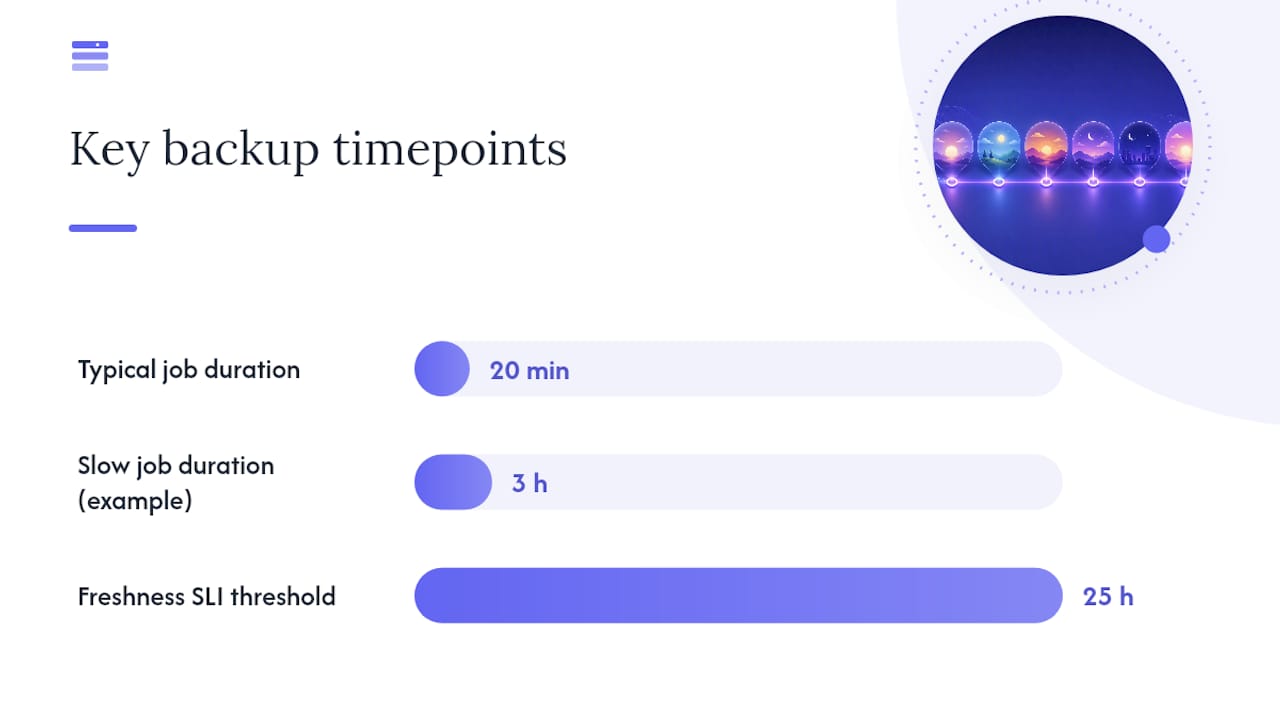
- Define a backup freshness SLI. Something as simple as “no successful backup in the last 25 hours triggers an alert” catches silent failures long before anyone notices during an actual outage.
- Track job duration and error rates over time. A backup job that used to take 20 minutes and now takes three hours is telling you something, usually about data growth outpacing your transfer configuration.
- Test restores on a quarterly cadence at minimum. Sample individual files monthly, and run at least one full server or database restore every quarter to confirm the whole chain actually works end to end.
Pro Tip: Don’t just check that the restore completed. Open the restored files and compare checksums against the source. A restore that “succeeds” but returns corrupted or truncated data is worse than a restore that fails loudly, because nobody investigates it until it’s too late.
Same-region replication alone isn’t disaster recovery. An immutable, off-site tier with client-side encryption protects against the scenarios that actually take companies down: ransomware and regional outages hitting your primary provider at the same time as your replica.
How Vpssnaps Fits Into an S3 Backup Strategy
Running restic on one server is manageable. Running it, plus rclone jobs, plus AWS Backup policies, across a dozen servers on multiple providers is where scripts start failing quietly and nobody notices for weeks. Vpssnaps automates that layer by coordinating provider-level snapshots and streaming them directly into buckets you own, with encrypted credential storage and detailed run logs tracking every job.
That combination matters most for teams managing multi-provider fleets, where consolidated logs and auditability replace a patchwork of cron jobs nobody fully trusts anymore. Provider-specific snapshot support means the platform can handle server images and structured backups without a separate script for every cloud.
Editorial Take: What Actually Matters Here
Most backup advice treats S3 as a single problem with a single answer, and that’s the mistake. The real work is matching each workload to its correct method: AWS Backup for buckets that are already S3-native, restic for anything that benefits from deduplication, and a managed layer once the script count outgrows what one person can audit on a Friday afternoon.
The conventional wisdom overweights the initial setup and underweights restore testing. A backup pipeline running flawlessly for six months tells you nothing if nobody has verified the restore actually returns intact data. That’s the part teams skip, and it’s the part that determines whether a ransomware event is a bad week or a resume-generating event.
If you’re prioritizing one thing first, prioritize the completion window and prerequisite checklist over the fancier features. Get versioning, IAM scoping, and KMS permissions right before worrying about which storage class saves you a few dollars a month. The expensive mistakes happen at the foundation, not the optimization layer.
— Scott
Try Automated S3-Compatible Backups With Vpssnaps
If you’ve read this far, you already know the DIY path works but takes real maintenance: scripts to babysit, IAM policies to audit, and logs scattered across every server you manage. Vpssnaps is the alternative to maintaining that patchwork yourself, streaming automated snapshots directly into buckets you own, with encrypted credential storage and run logs that flag failures before they become incidents.
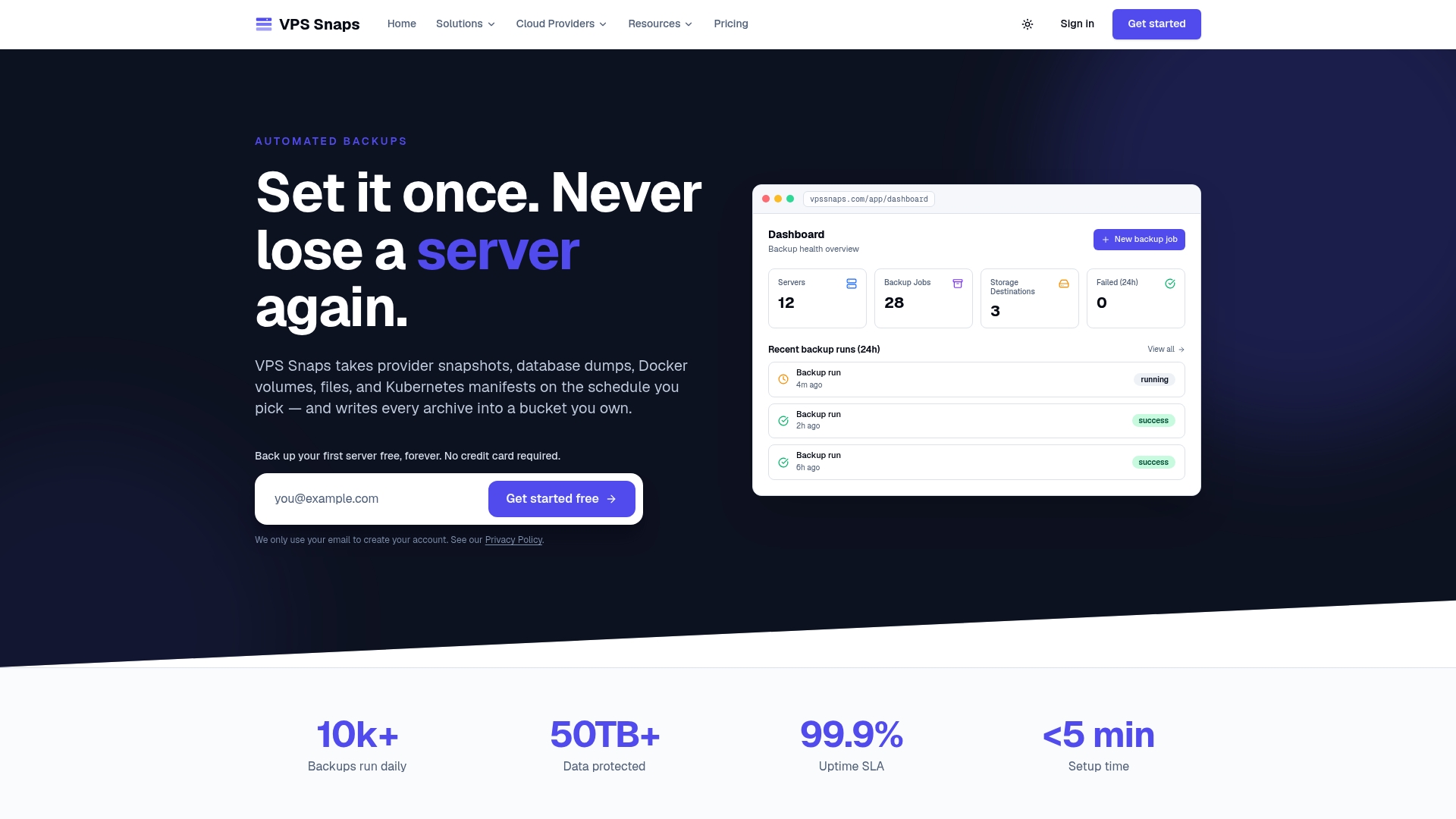
It covers seven major cloud providers, so a fleet spread across AWS, DigitalOcean, and other hosts gets one consistent backup workflow instead of separate scripts for each. Pricing starts with a free tier and scales up through Starter, Standard, and Pro plans as your server count grows. If you’re already running EC2 workloads, the EC2 backup integration handles AMI snapshots on a schedule without extra scripting.
Start with a test dataset on one server, confirm the run logs match what you expect, and expand from there.
Sources
- Amazon S3 backups - AWS Backup Developer Guide
- SQL Server back up to URL for S3-compatible object storage
- restic: Backup program
FAQ
What Is an S3 Backup?
An S3 backup is a copy of data, whether that’s bucket contents, server images, or database dumps, stored in Amazon S3 or an S3-compatible service for recovery purposes. It can come from AWS Backup’s native policies, from client-side tools like restic, or from a managed platform like Vpssnaps that streams snapshots into your own bucket.
How Much Does an S3 Backup Cost?
Costs depend on storage class, retention length, and API request volume, with archive tiers like Glacier costing far less than Standard storage but carrying retrieval fees. If you use a managed service, Vpssnaps plans run from $10 to $117 per month depending on the tier, on top of whatever S3 storage costs your provider charges.
How Do I Export Data to S3?
Use aws s3 sync for simple, non-deduplicated file copies, restic for database dumps and repeated data where deduplication and encryption matter, or rclone for large object migrations and directory syncs. AWS Backup handles S3-native buckets directly through its continuous and periodic backup policies.
Is Amazon S3 Like Google Drive?
Not really. S3 is object storage designed for applications, backups, and infrastructure, accessed through APIs rather than a consumer file-sync interface, and it lacks Drive’s built-in collaboration features. Where Drive is built for people sharing documents, S3 is built for systems moving structured data at scale, which is why backup tools like restic and rclone treat it as a programmable backend rather than a shared folder.