Stop Restore Failures: Backup Monitoring for MSPs/DevOps with Run Logs
Stop Restore Failures: Backup Monitoring for MSPs/DevOps with Run Logs
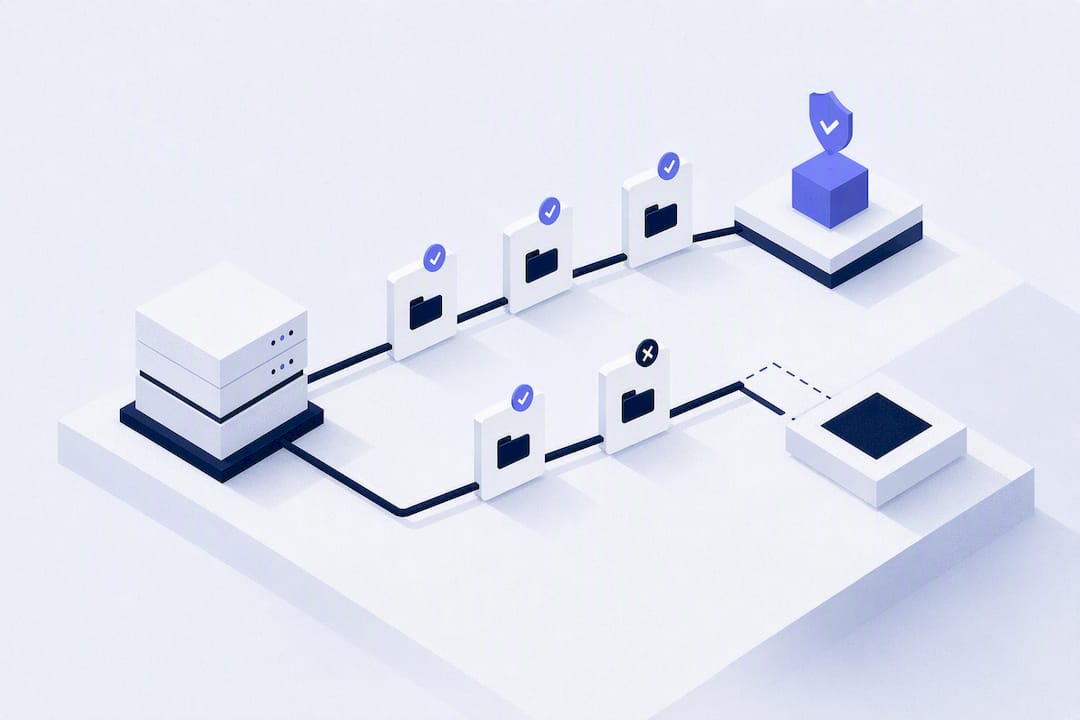
Backup monitoring works when it centralizes job status across every provider, verifies that backups can actually restore, and fires SLA-driven alerts before a client notices a problem. That combination stops the single most expensive failure mode in the business: a “successful” backup that turns out to be unrestorable when urgently needed. Before signing anything, map your entire server estate against one dashboard, then run a trial that specifically checks run-log detail and no-result detection.
TL;DR:
Backup monitoring must support no-result detection to identify silent job failures that do not produce error logs or alerts.
Cloud-native event ingestion through AWS, Azure, and GCP enables real-time alerts and reduces missed backup jobs compared to scheduled polling.
Verifying recoverability through test restores and detailed run logs is essential for true backup assurance, not just job completion confirmation.
Support for long retention of run logs and API integrations is critical to satisfy compliance audits and facilitate incident investigations.
Tiered and API-driven pricing models, combined with encrypted credential storage and support for multiple workload types, optimize total cost and security.
Table of Contents
What Backup Monitoring Software Needs to Do
A backup status alert that only says “job completed” is close to useless. Real backup monitoring software has to prove the job succeeded, prove the data can come back, and catch the jobs that never ran at all.
That last part trips up more tools than you’d expect. A cron job that silently stops firing produces no failure event, no error log, nothing to alert on. Centralized dashboards that normalize job status across vendors are the only reliable way to catch that kind of no-result failure, because they compare “did a job run today” against an expected schedule, rather than just parsing pass/fail flags.
The core feature set for centralized backup management looks like this:
-
Unified, normalized dashboard that pulls job status from every provider into one view, flagging missing runs, not just failed ones.
-
Recoverability verification, meaning test restores or checksum validation, plus historical retention long enough to produce audit evidence months later.
-
Anomaly detection on backup size, runtime, and object count, since a ransomware event or a broken script often shows up as a weird metric shift before it shows up as an outright failure.
-
SLA definitions with automated breach detection, tied to reporting a client or auditor can actually read.
-
Agent-based or agentless collection, depending on whether you can install software on the target or need to pull status through provider APIs.
-
API integrations and run-log retention deep enough to reconstruct what happened during an incident.
-
Notification channels with filtering, so a single flaky job doesn’t page three people at 3 a.m.
Skip any one of these and you’re back to spot-checking backups manually, which is the exact problem centralized monitoring exists to solve.
How Do You Choose a Backup Monitoring Tool?
Pick a backup monitoring tool by testing it against your actual failure modes, not its marketing page. Most vendors demo the happy path: dashboards full of green checkmarks. Ask what happens when a job silently stops running for a week, because that’s the scenario that actually costs MSPs client trust.
Run through this checklist during evaluation:
-
Coverage — does it support every provider and workload type you run (VMs, databases, Docker volumes, Kubernetes)?
-
SLA controls — can you define per-client or per-workload SLA thresholds, not just one global setting?
-
Recoverability checks — does it verify restorability, or just confirm a backup job exited without error?
-
Scale — will the dashboard stay usable at 50 servers, or does it fall apart past a dozen?
-
Retention history — how long are run logs and job history kept, and is that long enough for a compliance audit?
-
Alert noise controls — does it support deduplication and autoclose, or will one bad night trigger fifty tickets?
During the demo itself, ask pointed questions: How does the tool detect a missed job versus a failed one? Where are run logs stored, and can you export them independently of the vendor’s portal? How does it ingest cloud provider events, through native APIs or through screen-scraping a console? Can it auto-generate a ticket with a run-log link attached, or does someone have to copy-paste evidence manually?
Pro Tip: Ask for a sandbox with a deliberately broken backup job. If the vendor can’t quickly show you how their tool catches it, that gap will show up in production, usually during an actual incident.
Watch for red flags: no no-result detection, run logs that are just a pass/fail flag with no detail, or restore artifacts that only work inside the vendor’s own proprietary tool. That last one matters more than it sounds. If your backups only restore through the monitoring vendor’s interface, you’ve traded one single point of failure for another.
Cloud-Native Event Ingestion: AWS, Azure, and GCP Patterns
Polling a dashboard every few hours misses things that event-driven ingestion catches immediately. Every major cloud provider now publishes backup lifecycle events natively, and pulling those events straight into your monitoring pipeline beats waiting on a scheduled check.
AWS Backup publishes job events including BACKUP_JOB_STARTED, BACKUP_JOB_COMPLETED, and BACKUP_JOB_FAILED, and supports routing them through Amazon EventBridge or SNS. Azure Backup exposes vault-level metrics through Azure Monitor, letting you set alerts on backup and restore health at the account level. Google Cloud supports log-based alerts that trigger on specific query matches, such as jobStatus = FAILED, and route notifications to chat, email, or SMS.
The pattern that works across all three is this: a provider event fires, an event bus picks it up, a normalization layer maps it to your internal job taxonomy, alert rules evaluate it against SLA thresholds, and a ticket opens automatically if needed. Set this up once and missed jobs stop depending on someone remembering to check a portal.
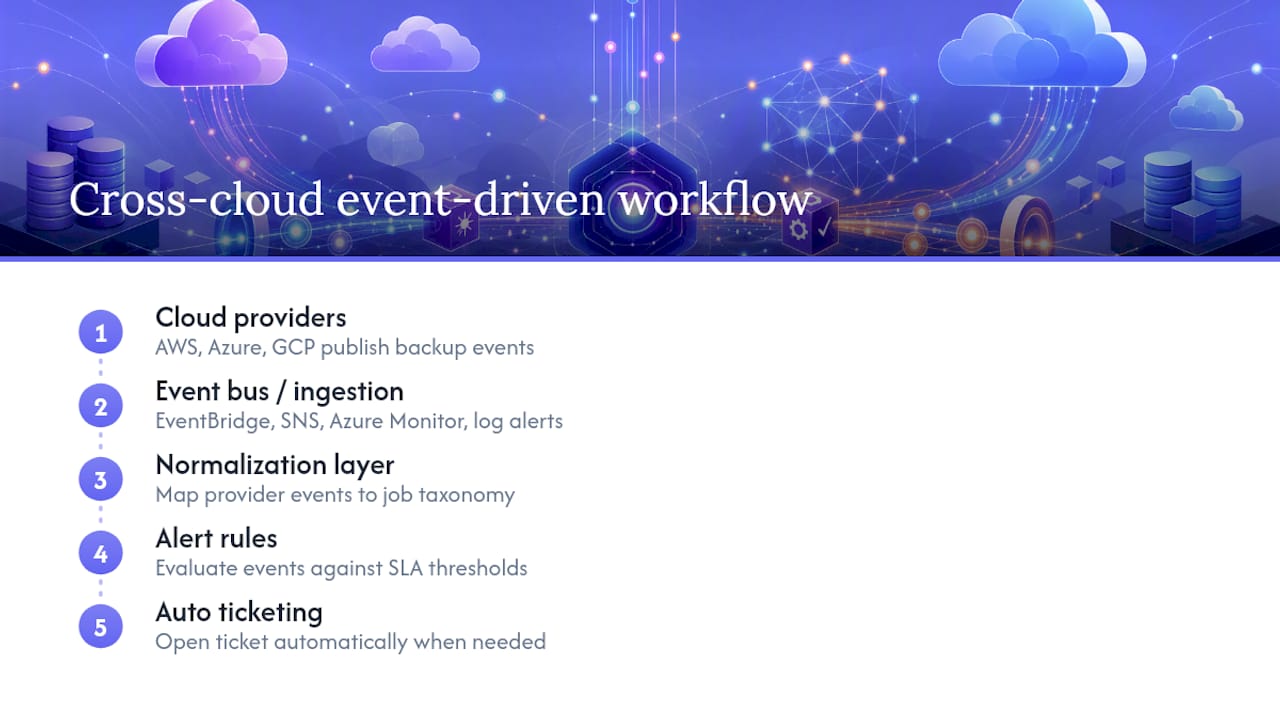
A few implementation notes worth knowing before you build this: EventBridge subscriptions need correctly scoped IAM permissions, encrypted SNS topics require extra key policy configuration, and subscription filters matter enormously. One AWS engineering writeup recommends filtering SNS notifications down to failed jobs only, specifically to avoid flooding your team with “job succeeded” noise that trains people to ignore alerts entirely.
Turning Alerts Into Operational Workflows
Raw log noise doesn’t protect anyone. What protects clients is an alert that maps directly to an SLA breach and routes into a ticket with enough context to act on immediately.
Build the workflow in this order:
-
Define alerts around SLA breaches, not every log line. A job running five minutes long isn’t news; a job that’s been silent for three cycles is.
-
Deduplicate and autoclose. If the same job fails twice in a row, that’s one incident, not two tickets. Once it succeeds again, close it automatically.
-
Connect alerts to ticketing with a playbook attached and an escalation path if the first responder doesn’t act within a set window.
-
Embed run-log links directly in the ticket so the technician isn’t hunting through a separate portal mid-incident.
-
Run routine evidence production: daily posture checks for internal review, weekly sprints to clear any lingering remediation items, and quarterly reports formatted for client business reviews.
Anomaly detection earns its place here too. A backup that suddenly triples in size or takes four times longer than usual often signals something worse than a slow disk. It can be an early indicator of ransomware encryption or a misconfiguration that a simple pass/fail check would never catch, since the job still technically “succeeds.”
Pro Tip: Tune anomaly baselines per client over a 30 to 90 day window before trusting the alerts. A retailer’s backup size spikes every holiday season, and a static threshold will page you every November for no reason.
Pricing Models and Total Cost of Ownership
Backup monitoring pricing usually falls into three structures: per-server or per-agent fees, per-GB-monitored pricing, or flat tiered plans scaled by feature set and workload count. Each has a different failure mode for MSPs managing dozens or hundreds of client servers.
Per-agent pricing scales predictably but punishes growth. Add ten new client servers and your bill jumps proportionally, even if those servers are small. Per-GB pricing does the opposite: it stays cheap for lots of tiny servers but gets expensive fast once a client starts running large database or media workloads. Tiered plans, where you pick a bracket based on server count or feature access, tend to be the easiest to forecast and explain to a client during a quarterly business review.
Total cost of ownership goes beyond the subscription line. Factor in the engineering time spent building normalization logic if the tool doesn’t handle multi-provider dashboards natively, the cost of false-positive alert fatigue burning technician hours, and the audit risk of a tool that doesn’t retain run logs long enough to satisfy a client’s compliance requirements. A cheaper tool that requires three extra hours a week of manual reconciliation isn’t actually cheaper.
Tiered SaaS pricing, like VPS Snaps’s plan structure, lets teams start small and scale as server count grows, which matters for MSPs onboarding new clients incrementally rather than committing to enterprise-scale contracts up front. Whatever pricing model you evaluate, ask specifically what counts as a “monitored unit,” since that definition varies more between vendors than the price itself.
Security and Compliance in Backup Monitoring
A monitoring tool that touches every server’s backup credentials is itself a security surface, not just a convenience layer. Credential handling deserves the same scrutiny you’d apply to the backups themselves.
Encrypted credential storage is table stakes, not a premium feature. If a monitoring platform stores API keys or service account credentials in plaintext, or bundles them into a shared vault without per-client isolation, that’s a real exposure, especially for MSPs holding credentials across dozens of client environments. Ask specifically how credentials are encrypted at rest and whether access is scoped per integration rather than granted broadly.
Compliance reporting is where monitoring earns its keep beyond day-to-day operations. Auditors for frameworks like SOC 2 or HIPAA typically want proof that backups ran on schedule, that failures were caught and remediated, and that retention policies were actually enforced, not just documented. A monitoring platform with detailed run logs and long retention windows turns that audit from a scramble into an export. Without it, someone spends a week manually reconstructing backup history from scattered provider consoles.
Data residency matters too, particularly for regulated industries. If your monitoring tool streams metadata or run logs through a third-party region you don’t control, that can complicate compliance even when the backups themselves stay compliant. Confirm where monitoring data lives, not just where the backups do, and make sure any provider integration uses least-privilege API scopes rather than full account access.
Vendor Support and SLAs for Monitoring Tools
The monitoring tool’s own uptime and support responsiveness matter more than most buyers initially plan for. If your backup monitoring platform goes down during an actual client incident, you’re now troubleshooting two problems at once with no visibility into either.
Ask vendors directly what their own SLA guarantees, not just what SLA features they let you configure for clients. Support responsiveness matters just as much: a ticket that sits unanswered for 48 hours during a live backup failure defeats the purpose of paying for monitoring in the first place.
For MSPs specifically, check whether support scales with your client count. A vendor that treats a 5 server account and a 500 server account identically for support priority is going to leave larger deployments waiting behind smaller ones, or vice versa depending on their queue logic. Multi-tenant support, where your team can escalate on behalf of a client without exposing that client’s credentials to the vendor’s support staff, is worth confirming explicitly before signing a contract.
Documentation quality is an underrated signal here. Vendors with detailed, current API documentation and event schemas tend to have engineering teams that take integration seriously. Vendors whose docs are thin or outdated usually make you discover integration quirks the hard way, mid-deployment.
Real-World Patterns in Backup Monitoring Rollouts
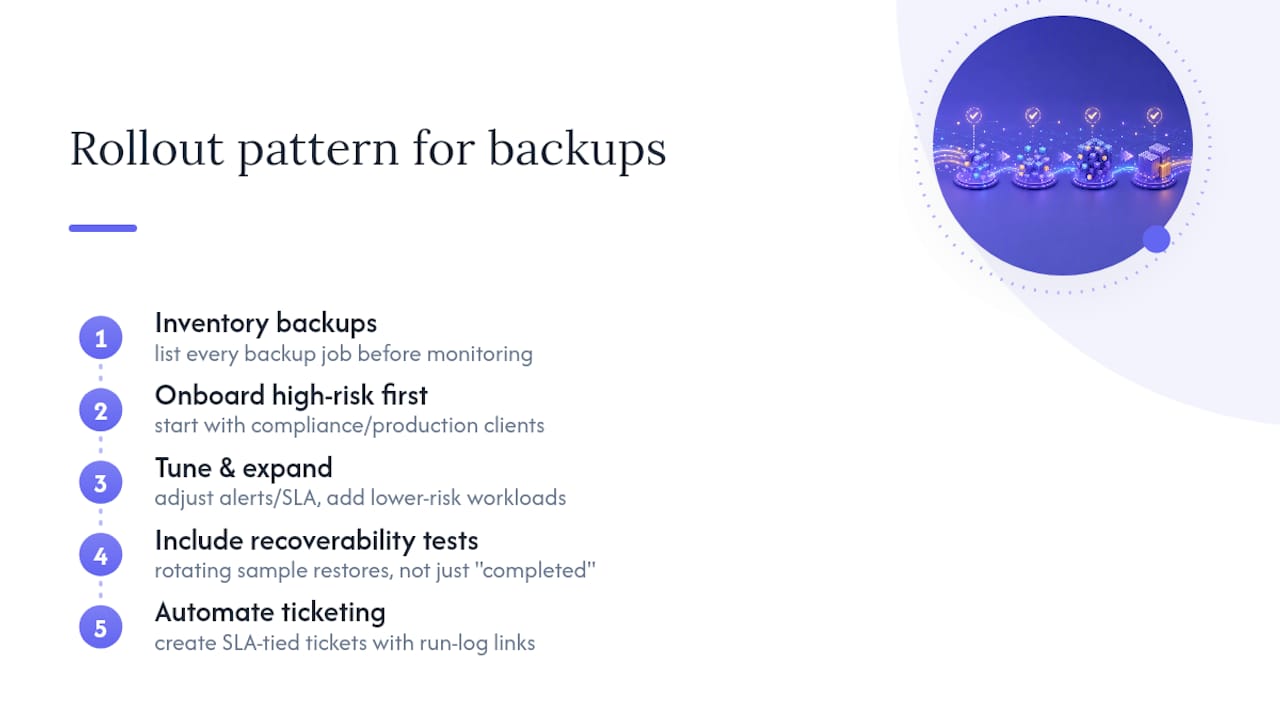
The MSPs that get backup monitoring right almost always start the same way: they inventory every backup job across every client before touching a monitoring tool, not after. Skipping that step means the dashboard goes live with blind spots baked in from day one, and nobody notices until a client asks for a restore that was never actually happening.
A common rollout pattern looks like this: connect the highest-risk clients first, typically those under compliance requirements or running production databases, then expand to lower-risk workloads once alert rules and SLA thresholds are tuned. Teams that try to onboard their entire client base simultaneously tend to drown in alert noise during the first two weeks, because default thresholds rarely match real-world backup timing across dozens of environments.
The pattern that consistently separates successful implementations from stalled ones is recoverability testing built into the rollout itself. Confirming a job “completed” is a low bar. Confirming a sample restore from that job actually works, on a rotating schedule across clients, catches the failures that job-status monitoring alone will always miss. Teams that build this into their onboarding checklist from the start report fewer surprise restore failures during actual incidents than teams that add it later as an afterthought.
Ticket automation tied to SLA breaches, rather than raw failures, is the other recurring theme. MSPs that wire monitoring directly into their ticketing system, with run-log links attached automatically, cut the time between failure detection and remediation start, because nobody has to manually correlate an alert email with a client account before opening a ticket.
Connecting Monitoring to SIEM and RMM Tools
Backup monitoring shouldn’t live in its own isolated silo. The most operationally mature setups feed backup events into the same systems already handling security and remote management, so a technician isn’t juggling four different consoles during an incident.
Integrating backup alerts into a SIEM turns a routine backup anomaly into part of the broader security picture. A sudden spike in backup runtime or size, correlated with unusual login activity on the same server, is a much stronger signal than either event alone. Most SIEM platforms accept webhook or API-based event ingestion, which means a normalized backup monitoring feed can slot in alongside firewall logs and endpoint detection data without custom engineering on the SIEM side.
RMM integration solves a more everyday problem: keeping technicians in one tool instead of two. If backup status can surface inside the same RMM dashboard used for patching and remote access, technicians stop context-switching between platforms to check whether last night’s backup actually ran before starting other maintenance work.
The practical requirement on both fronts is the same: your backup monitoring platform needs an API or webhook system that pushes normalized events out, not just a dashboard that holds data hostage inside its own interface. A tool with detailed run logs and API integrations, the same capabilities that matter for recoverability verification, is also what makes SIEM and RMM integration straightforward instead of a custom engineering project.
Why Event-Driven, API-First Monitoring Wins
Most backup monitoring failures trace back to one thing: trusting a status flag instead of verifying the artifact. A job can report “success” while the snapshot itself is corrupted, incomplete, or locked inside a format only the vendor’s own tool can read. That’s not monitoring. That’s a false sense of security with a green checkmark attached.
API-driven approaches that stream backups directly into storage you control, with encrypted credentials and detailed run logs, solve the trust problem differently. The evidence lives with you, not behind a vendor login. VPS Snaps builds around that principle across seven provider integrations, and it’s the right instinct for anyone tired of finding out a backup was theoretical the moment they needed it real.
— Scott
How VPS Snaps Maps to the Backup Monitoring Checklist
Everything covered above, the unified dashboard, recoverability verification, run-log detail, API-driven event ingestion, is exactly what VPS Snaps was built around. Instead of layering a separate monitoring product on top of scripts and cron jobs, VPS Snaps uses provider APIs directly to create scheduled snapshots across seven major cloud providers, streaming every backup into storage you own.
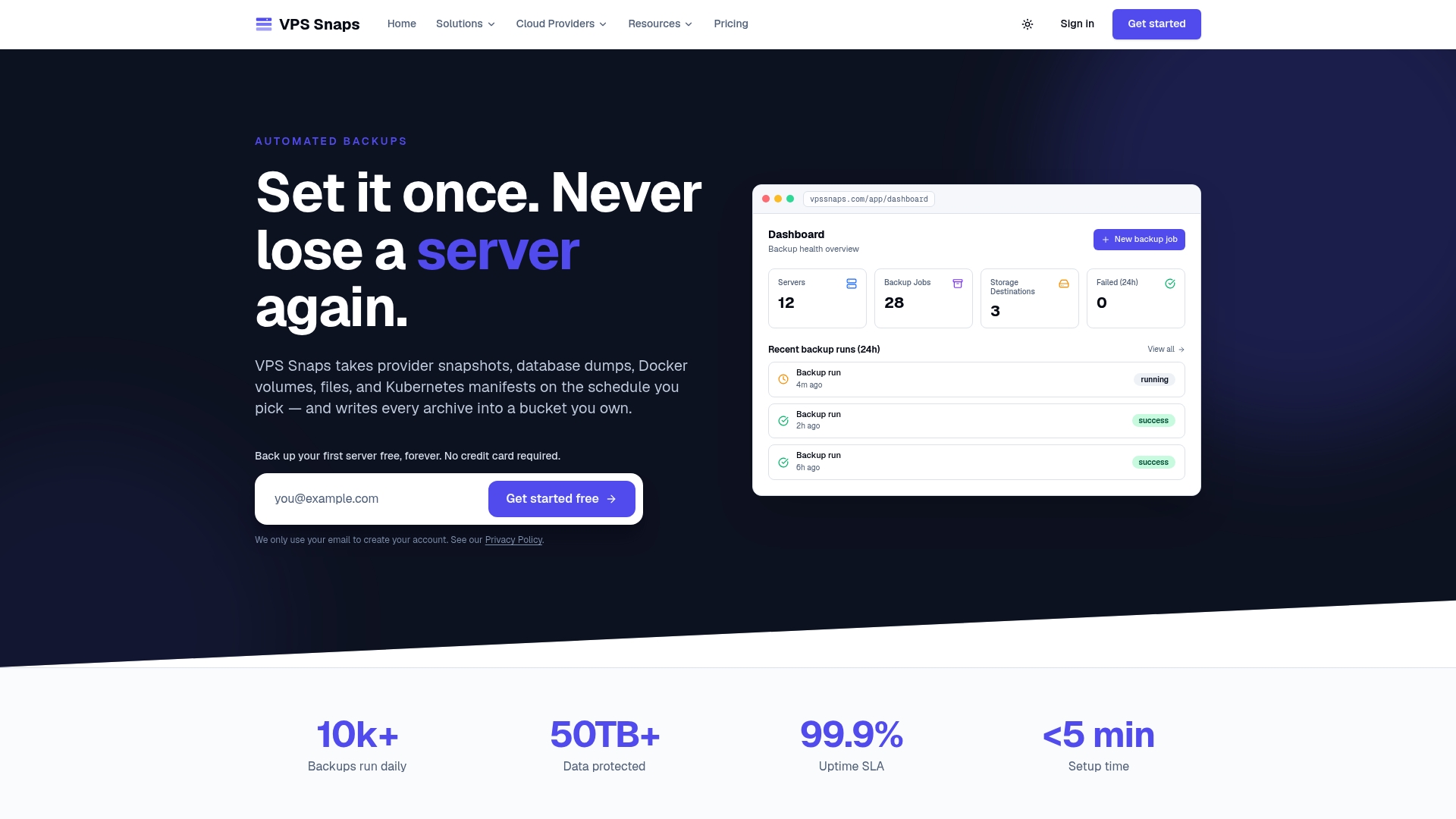
That last part solves the vendor lock-in problem raised earlier in this guide. Because snapshot artifacts land in your own bucket rather than a proprietary vault, restores don’t depend on staying a VPS Snaps customer. Every job produces detailed run logs and encrypted credential handling, so when a client or auditor asks for proof a backup ran and succeeded, you’re pulling a record instead of reconstructing one from memory.
The practical next step: spin up a sandbox integration against one server, whether it’s running Docker volumes, a database, or a Kubernetes cluster, and check the run logs yourself. See whether a deliberately interrupted job shows up clearly. Plans start with a free tier for testing, scaling up through Starter, Standard, Pro, and Agency tiers as your server count grows. If backup monitoring for your estate currently depends on someone remembering to check a dashboard, that sandbox test is worth thirty minutes this week.
Key Implementation Docs and Research
For teams building the patterns in this guide, start with AWS Backup’s event and notification reference, Azure Backup’s monitoring and alerts documentation, and Google Cloud’s log-based alert configuration guide. For anomaly detection grounded in real backup workload data, the USENIX FAST study on backup storage characteristics remains one of the more rigorous references available.
Sources
FAQ
What Is the 3-2-1 Backup Rule?
The 3-2-1 rule means keeping three copies of your data, on two different types of storage media, with one copy stored offsite. Backup monitoring enforces this by confirming all three copies actually completed and remain recoverable, not just that a backup job started.
What Is the Best Backup Monitoring Software?
There’s no single best tool for every environment. The right choice depends on provider coverage, SLA granularity, and whether run logs and recoverability checks meet your audit requirements. Some tools focus specifically on API-driven, multi-provider snapshot automation with detailed run logs for teams that need auditable evidence.
Which Monitoring Approach Works Best for MSPs?
Centralized, SLA-driven monitoring that normalizes job status across every client and provider works best for MSPs, because it catches missed jobs and SLA breaches without requiring manual checks per client. Native cloud event ingestion through services like AWS EventBridge or Azure Monitor strengthens that approach further.
What Are the Four Types of Backups?
The four common types are full backups, incremental backups, differential backups, and mirror backups. Effective backup monitoring needs to track all four types differently, since a missed incremental job looks very different in the logs than a missed full backup.
Does VPS Snaps Include Backup Monitoring Features?
VPS Snaps provides detailed run logs, failure alerts, and encrypted credential storage as part of its automated backup service across seven cloud providers. Current pricing for all plans is available on the VPS Snaps pricing page.